# GraffitiCard
Class Inherits GraffitiUIControl
## About
GraffitiCard is a mobile implementation of popular web components meant to convey information in an encapsulated form with a call-to-action button.
**
Features:
**
*
Optional Title, Image, Header, Subheader, Content, and Button areas
*
Dark Mode aware
*
Text is fully customizable
*
Auto-height support for variable content
## Preview
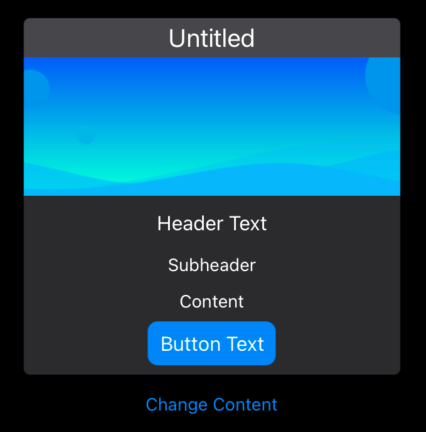
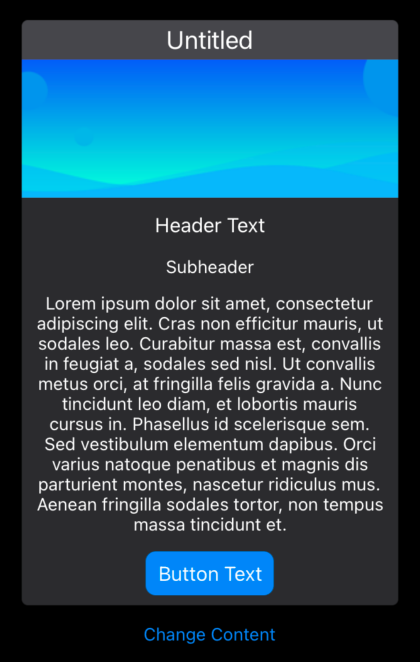
Previous
Next
## Compatibility
### Framework API Version
| 1.0 | 2.0 |
| :---: | :---: |
| False | True |
### Console
| 32-Bit | 64-Bit |
| :---: | :---: |
| True | True |
### Desktop
| 32-Bit | 64-Bit |
| :---: | :---: |
| True | True |
### iOS
| 32-Bit | 64-Bit |
| :---: | :---: |
| False | True |
### Web
| 32-Bit | 64-Bit |
| :---: | :---: |
| True | True |
## Enumerations
| Name | Value | Description |
| --- | :---: | --- |
| Alignments | Left <br> Center <br> Right | Supported text alignments. |
## Event Definitions
| Name | Parameters | Return Type | Description |
| --- | :---: | :---: | --- |
| ButtonPressed | (None) | (None) | Raised when the user clicks the card's button. |
| Closing | (None) | (None) | |
| HeightChanged | (None) | (None) | Raised when the height of the card has changed. Only fires when the AutoHeight property is True. |
| TitleBackgroundPaint | g as Graphics | (None) | Overrides painting of title area background. |
| TitleTextPaint | g as Graphics | Boolean | Raised when the title text is being drawn. Return True to override. |
## Properties
| Name | Type | Default Value | Description |
| --- | :---: | :---: | --- |
| AutoHeight | Boolean | Nil | When True the Card will resize vertically so that its content fills the entire area. |
| BackgroundColor | ColorGroup | Nil | Color applied to card background. |
| BorderColor | ColorGroup | Nil | Color applied to card border. |
| Button | String | Nil | When length = 0, button will not be shown. |
| ButtonBorderRadius | Integer | Nil | Border radius of button object. |
| ButtonColor | ColorGroup | Nil | Color applied to button object's background |
| ButtonFontSize | Integer | Nil | Font size applied to button text. |
| ButtonFontStyle | GraffitiUIControl.FontStyles | Nil | Font style applied to the button. |
| ButtonTextColor | ColorGroup | Nil | Color applied to button object's text. |
| Content | String | Nil | Text to be displayed in the content area of the card. |
| ContentAlignment | Alignments | Nil | Drawing position of content. |
| ContentFontSize | Integer | Nil | Font size used for drawing content text. |
| ContentFontStyle | GraffitiUIControl.FontStyles | Nil | Font style applied to the content. |
| ContentTextColor | ColorGroup | Nil | Color applied to content text. |
| CornerRadius | Double | Nil | Determines the roundness of the cards' corners. |
| Header | String | Nil | Text to draw in the header position of the card. |
| HeaderFontSize | Integer | Nil | Font size of header. |
| HeaderFontStyle | GraffitiUIControl.FontStyles | Nil | Font style applied to the header. |
| HeaderTextColor | ColorGroup | Nil | Color applied to header text. |
| Image | Picture | Nil | Image displayed below the title and above the header. |
| ParentView | MobileScreen | Nil | Parent view of the control. Either MobileScreen, MobileContainer, or MobileUIControl. |
| Subheader | String | Nil | Text displayed below the header and above the content. |
| SubheaderFontSize | Integer | Nil | Font size used for subheader text. |
| SubheaderFontStyle | GraffitiUIControl.FontStyles | Nil | Font style applied to the subheader. |
| SubheaderTextColor | ColorGroup | Nil | Color applied to subheader text. |
| Title | String | Nil | The title of the card. Appears above all other elements. |
| TitleBackgroundColor | ColorGroup | Nil | Background color of the titlebar. |
| TitleFontSize | Integer | Nil | Font size of title text. |
| TitleFontStyle | GraffitiUIControl.FontStyles | Nil | Font style applied to the title. |
| TitleTextColor | ColorGroup | Nil | Applies the specified color to the title text. |
## Examples
### Conditionally Applying a Dark/Light Image
```
Sub Open() Handles Open
me.Image = demo_header_bg_light
if GraffitiColors.SystemAware.IsDarkMode then
me.Image = demo_header_bg_dark
end if
End Sub
```
